Description
ACEFAST J17 USB-A Hub 4-in-1 High-Speed USB3.0 with Braided Cable:
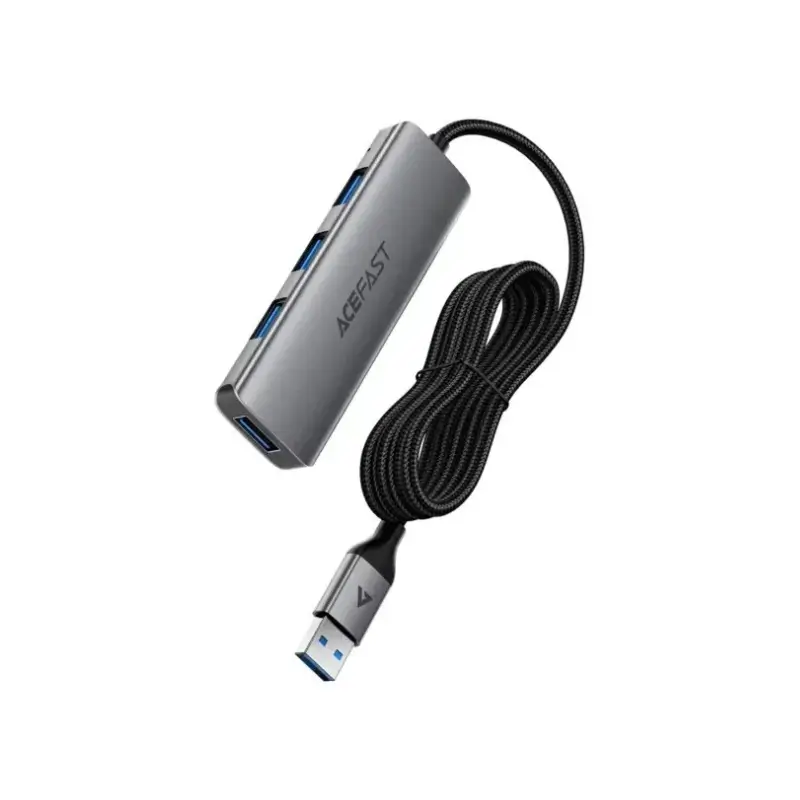
The ACEFAST J17 USB-A hub 4-in-1 turns a single USB-A port into four, making it easy to connect a mouse, keyboard, flash drive, and external hard drive at the same time without constantly swapping cables. Built around a USB3.0 interface, this USB-A hub delivers a theoretical transfer speed of up to 5Gbps, so large files, backups, and peripherals all run smoothly with minimal waiting.
Whether you're working at a desk with limited ports, setting up a study station, or organizing a home office, the J17 keeps your devices connected in one tidy hub instead of a tangle of adapters. The aluminum alloy housing and nylon braided cable are designed to handle daily plugging and unplugging without wearing down, so the hub stays reliable through everyday use.
With true plug-and-play operation, there's no software to install and no drivers to configure — simply connect the hub to a USB-A port and start using all four connected devices right away.
Key Features
- 4-in-1 USB-A Splitter: Expands a single USB-A port into four USB3.0 ports, so you can connect multiple accessories without constantly unplugging and replugging devices.
- 5Gbps Transfer Speed: The USB3.0 interface supports a theoretical transfer speed of 5Gbps, helping file transfers and external storage devices perform noticeably faster than basic USB2.0 hubs.
- Plug & Play, No Lag: No drivers or software setup required — connect the hub and your devices are recognized instantly, saving time when switching between accessories.
- Aluminum Alloy Housing with Nylon Braid: A durable aluminum shell combined with a nylon braided cable resists everyday wear, making the hub better suited to frequent travel and desk use than plastic alternatives.
- Wide Compatibility: Works with a broad range of USB-A-equipped laptops and desktops, making it a flexible accessory for both home and office setups.
- Safety Certified: Backed by CE, FCC, EAC, and RoHS certification, giving users added confidence in the hub's build quality and electrical safety.
Why Choose This Product (USB-A Hub 4-in-1)
The ACEFAST J17 solves a common problem — not having enough USB ports — without adding bulk to your setup. Instead of buying multiple single-port adapters, one compact hub gives you four usable ports in a single cable, keeping your desk or bag organized. The 5Gbps USB3.0 speed means it's genuinely useful for transferring files and running external drives, not just charging small accessories.
Its aluminum alloy body and braided cable are built to handle daily use, so it holds up well whether it's tossed in a laptop bag every day or left permanently on a desk. For anyone who regularly connects a mouse, keyboard, USB drive, or printer to a laptop with limited ports, this hub offers a simple, durable, and fast way to stay connected.
Best Use Cases
- Office: Connect a mouse, keyboard, and external drive simultaneously on laptops with only one or two USB-A ports.
- Home: Keep frequently used accessories like printers, card readers, and drives connected without repeated plugging.
- Students: Expand port availability on lightweight laptops for classes, projects, and file transfers.
- Travel: A single compact hub replaces the need to carry several individual adapters.
Technical Specifications
| Specification | Details |
|---|---|
| Model | ACEFAST J17 |
| Type | USB-A Hub 4-in-1 |
| Interface | USB-A male to 4 × USB-A (USB3.0) ports |
| Transfer Speed | Theoretical speed up to 5Gbps |
| Working Voltage | 5V |
| Quiescent Current | 30mA |
| Operating Current | 1A – 3A |
| Operating Temperature | 0°C – 70°C |
| Material | TPE + Nylon Braid + Aluminum Alloy + ABS |
| Dimensions | 95 × 30 × 11.6 mm |
| Cable Length | 1m |
| Weight | 59g |
| Certification | CE, FCC, EAC, RoHS |


Frequently Asked Questions
Does the ACEFAST J17 support 5Gbps transfer speed on all ports?
Yes, all four USB3.0 ports share the hub's theoretical 5Gbps transfer speed, depending on the connected device and cable.
Do I need to install drivers to use this USB-A hub?
No, the J17 is plug-and-play — simply connect it to a USB-A port and your devices will be recognized automatically.
Is the ACEFAST J17 hub safe to use for long periods?
Yes, it's certified under CE, FCC, EAC, and RoHS standards and rated for operating temperatures between 0°C and 70°C.
What devices can I connect to the J17 hub?
You can connect USB peripherals such as a mouse, keyboard, flash drive, external hard drive, or printer, thanks to its wide compatibility.
How durable is the build quality?
The hub uses an aluminum alloy housing and a nylon braided cable, both chosen for better everyday durability compared to plastic-only hubs.
What is the warranty on this product?
Please check with the seller for the exact warranty period applicable to your purchase.
No reviews yet. Bought this? Tell others how it works for you.